
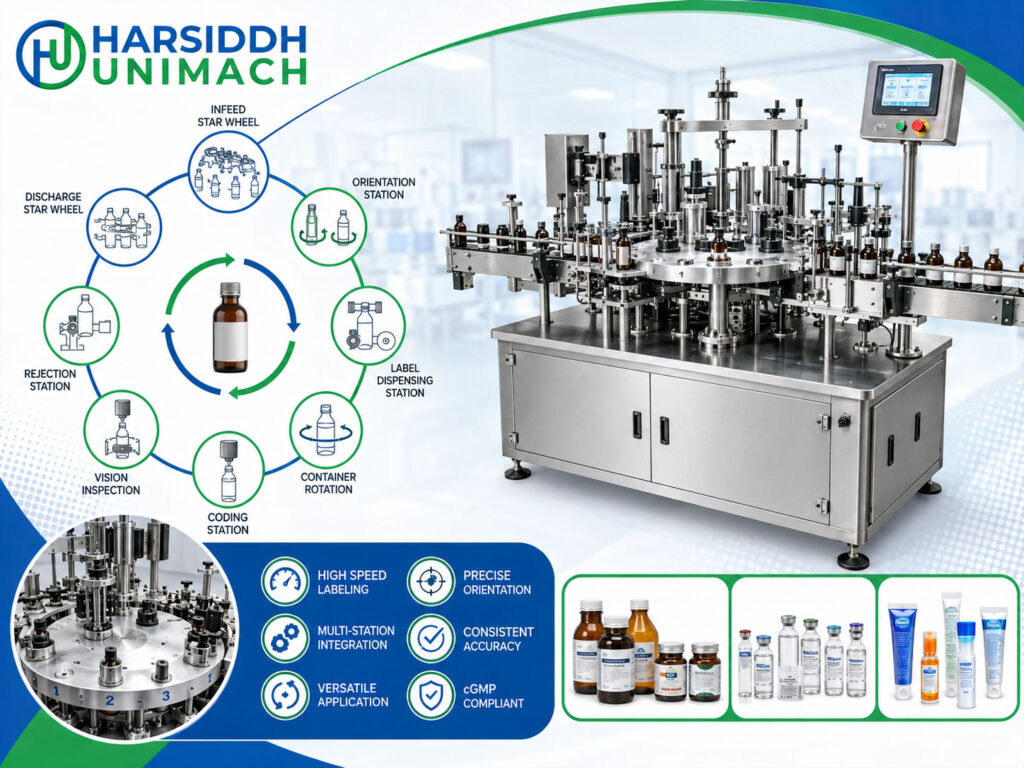
Most people picture a labelling machine as a straight conveyor with a label head on the side. That is the linear (inline) design, and it works very well for many applications. But when production speeds rise, labels must be placed with very high precision, or several labels must go onto the same container in exact relationship to each other, manufacturers often turn to a rotary sticker labeling machine.
In a rotary labeller, containers are not simply carried past a label head. They are transferred onto a rotating carousel, held firmly on individual plates, and turned under precise control while labels are applied. This gives exceptional control over each container’s position and rotation.
In this article, we explain how a rotary sticker labeling machine works, its main components, the step-by-step process, how it differs from a linear labeller, the settings that matter and how to solve common problems. For the general principles of self-adhesive labelling, start with our sticker labeling machine working principle.
What Makes a Rotary Labeller Different?
In a linear labeller, the container moves along a straight conveyor and is rotated, if needed, by a wrap belt rubbing against its side. Control of the container depends on friction and guides.
In a rotary labeller:
- Each container sits on its own plate on a rotating carousel.
- A top centring head presses down from above, clamping the container between the plate and the head.
- The plate can be rotated by a cam or servo motor at precise speeds and angles.
- Label stations are positioned around the carousel, so the container can be presented to each one at exactly the right angle.
The result is positive, mechanical control of each container from infeed to outfeed.
Main Components of a Rotary Sticker Labeling Machine
- Infeed conveyor – carries containers to the machine.
- Infeed worm (feed screw) – spaces containers to the exact pitch of the carousel.
- Infeed star wheel – transfers each container from the conveyor onto a carousel plate.
- Main carousel (turret) – rotates continuously, carrying a ring of container plates.
- Container plates – individual platforms, each able to rotate under cam or servo control.
- Top centring heads – spring-loaded heads that descend onto each container and hold it securely on its plate.
- Label stations – one or more label heads positioned around the carousel, each with unwind, gap sensor, peel plate, drive and rewind.
- Brushing or rolling stations – pads, brushes or rollers that smooth labels after application.
- Orientation sensors (optional) – detect a feature on the container so it can be turned to the correct position before labelling.
- Outfeed star wheel – takes labelled containers off the carousel.
- Outfeed conveyor – carries containers away.
- Coding and inspection units (optional) – print variable data and check label presence or position.
- Main drive and control system – synchronises carousel, plates, star wheels and label heads.
Step-by-Step: How a Rotary Sticker Labeling Machine Works
Step 1: Infeed and spacing
Containers arrive on the conveyor in a line. The infeed worm grips them gently and spaces them to the exact pitch between plates on the carousel. Accurate pitch is essential, because each container must arrive at a plate at precisely the right moment.
Step 2: Transfer to the carousel
The infeed star wheel takes each container from the worm and places it on a carousel plate. At the same moment, the top centring head descends and clamps the container from above. The container is now held securely and will travel around the carousel.
Step 3: Orientation (if required)
For containers that must be labelled in a specific position relative to a feature, such as a seam, a moulded mark, a handle or an existing print, the plate rotates the container while a sensor looks for that feature. When it is found, the plate stops at a set angle. Every container is now facing the same way.
Step 4: Label application
As the carousel rotates, each container passes a label station. The label head dispenses a label at the speed of the container surface, and its leading edge sticks to the container.
The plate rotates the container at a controlled speed so the label wraps around it, either fully or partially. Because the plate’s rotation is mechanically or servo controlled, the label is placed precisely and wraps evenly.
For containers that need more than one label, such as front and back, body and neck, or a main label plus a separate information label, further label stations around the carousel apply them in turn. The container’s angle can be set precisely for each station, so labels sit in exact relationship to each other.
Step 5: Brushing and pressing
After each label is applied, the container rotates against brushes, sponge pads or rollers that smooth the label and press down the edges.
Step 6: Coding and inspection
Coders may print variable data on the label before it is dispensed. Sensors or cameras can check that each label is present and correctly positioned.
Step 7: Release and discharge
At the end of its journey around the carousel, the top centring head rises and the outfeed star wheel removes the container onto the outfeed conveyor. The empty plate continues round to receive the next container.
Rotary vs Linear Sticker Labeling Machines
| Feature | Rotary Labeller | Linear Labeller |
|---|---|---|
| Container control | Clamped on rotating plates | Guided by belts and friction |
| Typical output | Medium to very high | Low to medium-high |
| Label placement precision | Very high | Good |
| Orientation to container features | Built in, very precise | Limited |
| Multiple labels per container | Easily handled at several stations | Possible with multiple heads |
| Changeover | More change parts (worm, star wheels, plates, heads) | Fewer, often quicker |
| Footprint | Larger | Compact |
| Investment | Higher | Lower |
| Best suited to | Dedicated, high-output lines and premium labelling | Flexible lines, many products, smaller batches |
Neither design is “better” in every case. Linear machines are ideal for flexibility and lower outputs; rotary machines excel when speed, precision and orientation are priorities.
For a linear round bottle labeller, see the Automatic Round Bottle Sticker Labeling Machine, the bottle sticker labeling machine and the vertical bottle sticker labeling machine. For more on bottle-specific labelling, read our bottle labeling machine working principle.
Rotary Labelling Machines from Harsiddh
- Automatic Rotary Sticker Labeling Machine
- Automatic Rotary Ampoule Sticker Labeling Machine
- Rotary ampoule sticker labeling machine
For precise dual-label work on flat bottles, see the Automatic Front and Back Sticker Labeling Machine and the labeling machines for flat bottles. For vials, see the vial sticker labeling machine.
Browse all labeling machines, the labeling machines on Harsiddh Engineering and the labeling machines for round bottles.
Cam-Driven vs Servo-Driven Plates
Cam-driven plates
Plate rotation is controlled by a fixed mechanical cam under the carousel. As the carousel turns, cam followers make each plate rotate through a set pattern. Cam systems are robust and repeatable but are fixed for a particular rotation pattern; changing the pattern means changing the cam.
Servo-driven plates
Each plate has its own servo motor. The rotation pattern, including speed, angle and pause, is programmed and stored as a recipe. Servo plates allow:
- Quick changeovers between products by recalling recipes
- Precise orientation to container features
- Complex label patterns and multiple labels
- Fine adjustment from the control panel
Servo systems are more flexible but more complex. The right choice depends on how many different products and label patterns the line runs.
Where a Rotary Labeller Fits in the Line
A typical high-output liquid line runs:
- Bottle unscrambling and cleaning
- Filling and capping, for example on a liquid bottle filling and capping machine (monoblock) or a filler followed by a bottle screw and ROPP capping machine
- Induction sealing
- Rotary labelling
- Inspection, cartoning and packing
Because rotary labellers often run at high speeds, upstream and downstream machines must keep pace, with conveyor buffers to absorb short stoppages. For more on high-output labelling, read our high-speed labeling machine working principle.
Key Settings and Their Effects
| Setting | What It Controls | Effect If Wrong |
|---|---|---|
| Worm and star wheel timing | Container transfer to plates | Containers mispositioned, falling or jamming |
| Top centring head pressure | Holding force on container | Slipping containers, or deformation of light containers |
| Plate rotation speed | Label wrapping | Wrinkles or stretched labels |
| Orientation sensor and stop angle | Container position before labelling | Labels misaligned with container features |
| Label head position and timing | Label placement | Labels too high, low or off-angle |
| Brush or roller pressure | Smoothing | Bubbles, lifted edges |
| Carousel speed | Overall output | Mismatch with label head capability |
Troubleshooting Common Rotary Labelling Problems
| Problem | Likely Cause | Corrective Action |
|---|---|---|
| Containers falling at transfer | Worm or star wheel timing off, wrong change parts | Re-time transfer, fit correct parts |
| Containers slipping on plates | Low centring head pressure, worn plate pads | Increase pressure, replace pads |
| Wrinkled labels | Plate rotation and label speed mismatched | Synchronise speeds |
| Labels misaligned to features | Orientation sensor or stop angle wrong | Re-teach sensor and angle |
| Second label not aligned with first | Station timing or angle wrong | Adjust second station timing |
| Bubbles or flagging | Brushing pressure too low, label too stiff | Increase brushing, review label material |
| Light bottles deforming | Centring head pressure too high | Reduce pressure, use suitable heads |
| Machine stopping frequently | Upstream supply gaps or downstream back-ups | Add buffers, balance line speeds |
Changeover on a Rotary Labeller
Rotary labellers carry more format parts than linear machines, so changeovers need good planning. A typical changeover includes:
- Line clearance of all containers and labels from the previous batch
- Changing the infeed worm, star wheels and guides for the new container
- Changing or adjusting plate pads and centring heads
- Setting label station heights and loading new label rolls
- Recalling the servo recipe or fitting the correct cam for the new rotation pattern
- Re-teaching orientation sensors, if used
- Running test containers and checking label position and alignment before production
Colour-coded change parts, height scales and stored recipes help keep changeover times short and results consistent.
Maintenance Tips
- Inspect and replace plate pads and centring head inserts regularly.
- Check cam tracks and followers (cam machines) or servo drives and cabling (servo machines).
- Lubricate the carousel drive and bearings according to schedule.
- Clean adhesive build-up from peel plates, brushes and rollers.
- Inspect worm, star wheels and guides for wear.
- Keep change parts for each container labelled and stored together.
For a detailed list of components to inspect, read high-speed labeling machine maintenance: components that require regular inspection.
How to Choose a Rotary Sticker Labeling Machine
- Output – carousel size and number of plates
- Containers – shapes, sizes and materials
- Label positions – number of labels and stations
- Orientation needs – whether labels must align with container features
- Plate drive – cam or servo
- Changeover frequency – number of products and container sizes
- Coding and inspection requirements
- Line integration with fillers, cappers and packers
Frequently Asked Questions
What is the working principle of a rotary sticker labeling machine? Containers are spaced by an infeed worm, transferred by a star wheel onto plates on a rotating carousel and clamped from above. As the carousel turns, each plate rotates the container under control while label stations apply self-adhesive labels. Brushes smooth the labels and an outfeed star wheel removes the containers.
What are the advantages of a rotary labeller over a linear one? Rotary labellers offer higher speeds, very precise label placement, built-in orientation and easy application of multiple labels.
When is a linear labeller better? For lower outputs, frequent product changes and lines where flexibility and lower investment matter more than maximum speed.
What is the difference between cam and servo plates? Cam plates follow a fixed mechanical rotation pattern; servo plates follow a programmed pattern that can be changed by recipe.
Can a rotary labeller apply front and back labels? Yes. Multiple label stations around the carousel can apply front, back, neck or other labels in exact relationship to each other.
Considering a rotary labelling solution? Contact our team or send an inquiry with your container samples, label designs and output requirements.